
Forget the dock
Once upon a time, there was a poor (very poor) developer, saving for a long time to be able to buy a Macbook Pro 13 ”, a small screen, so it worked hard, but he also told himself that this is also the motivation. To try harder, the poor (poor) developer has to set auto hide mode for the dock to save space. But hey, every time you want to move an app, you have to hover the mouse on the edge of the screen and then wait two or three seconds, the most painful is if you're in the app in fullscreen mode, the dock sometimes does not usually exist. One summer day, when it was hot outside, the air conditioner could only open 26 degrees, the patience that was lacking now evaporated somewhat. He raised his face to the sky and shouted: “Should I have to use the dock all my life? (Actually, using mac is good). ”
Then the honesty deep in his soul returned when he suddenly realized that he could use the touch bar to switch apps. But oh my, in front of me was the ASUS ROG Claymore Aura RGB Cherry MX Red keyboard, my hand was not the kind of hand that was so coaxing, so I could not reach it. He leaned his face into the unattractive keyboard, tears falling, two warm tears flowing into each key, wet all numpad, now he realized that he had never had in his life. So much money that numpad has to be calculated. So he decided to map numpad keys with BetterTouchTool to transfer apps. That's it
Drama a little to catch up with the trend, but I'm not a smoker, don't misunderstand. Actually, the solution is very simple. I use BetterTouchTool to map keys on numpad and function files (F1, F2, F3, ...) with a certain script to activate or open a certain application. Here I have a list of applications that I regularly use: PhpStorn, Goland, iTerm 2, Mongodb Compass, Chrome, Clipboard, Snippet, Zalo, Slack, Facebook (ahihi).
Better Touch Tool is an application used to customize input devices on mac.
Replace MongoDB Compass Community with the name of the app you want to activate, this is the name of the app in the Applications folder.
For activating a tab in chrome it is a bit more complicated. First you need to create the open_url.applescript file somewhere, I am gathering the scripts in the ~ / scripts directory so I will create the file ~ / scripts / open_url.applescript with the following content:
on run {targetUrl}
tell application "Google Chrome"
activate
set theUrl to my remove_http(targetUrl)
if (count every window) = 0 then
make new window
end if
set found to false
set theTabIndex to -1
repeat with theWindow in every window
set theTabIndex to 0
repeat with theTab in every tab of theWindow
set theTabIndex to theTabIndex + 1
set theTabUrl to my remove_http(theTab's URL as string)
if (theTabUrl contains theUrl) then
set found to true
exit repeat
end if
end repeat
if found then
exit repeat
end if
end repeat
if found then
set theWindow's active tab index to theTabIndex
set index of theWindow to 1
else
tell window 1 to make new tab with properties {URL:targetUrl}
end if
end tell
end run
on remove_http(input_url)
if (input_url contains "https://") then
return trim_line(input_url, "https://")
else
return trim_line(input_url, "http://")
end if
return input_url
end remove_http
on trim_line(this_text, trim_chars)
set x to the length of the trim_chars
-- TRIM BEGINNING
repeat while this_text begins with the trim_chars
try
set this_text to characters (x + 1) thru -1 of this_text as string
on error
-- the text contains nothing but the trim characters
return ""
end try
end repeat
return this_text
end trim_line
Now create the same trigger as in the previous step, but instead of choosing applescript, choose execute terminal command:
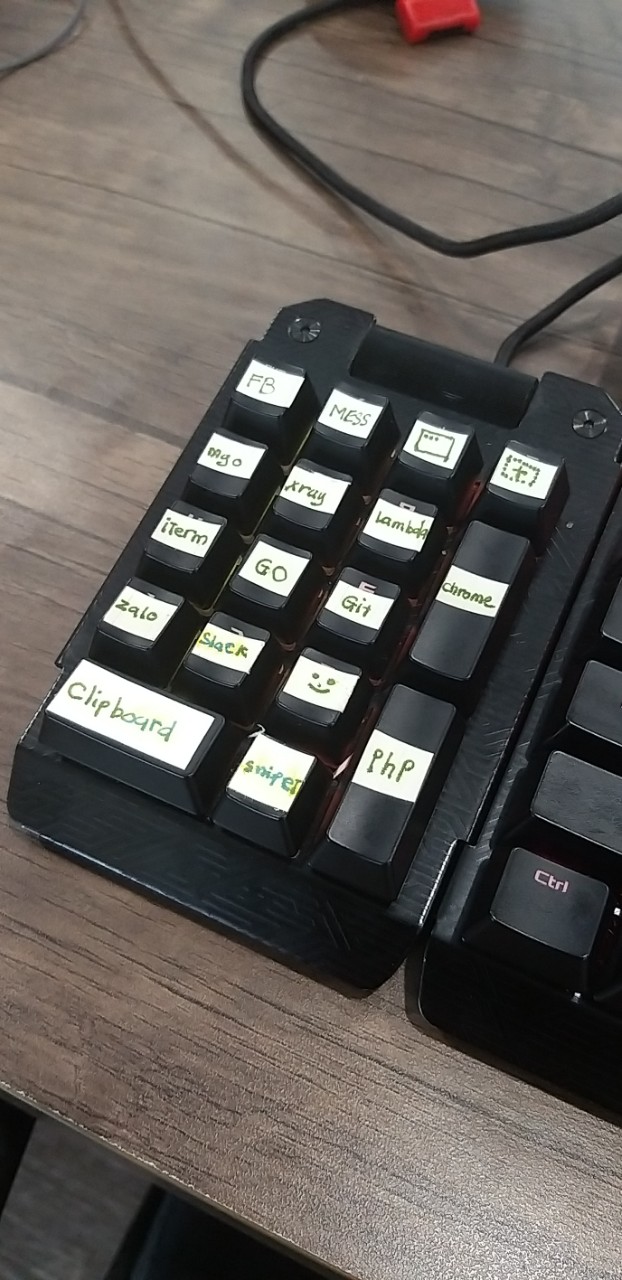
Now map all the keys on the numpad and then cut the paper on each key so that you know how to press:
In your free time, you can learn to remix a song, but your boss will not know if you are entertained or working.
Then the honesty deep in his soul returned when he suddenly realized that he could use the touch bar to switch apps. But oh my, in front of me was the ASUS ROG Claymore Aura RGB Cherry MX Red keyboard, my hand was not the kind of hand that was so coaxing, so I could not reach it. He leaned his face into the unattractive keyboard, tears falling, two warm tears flowing into each key, wet all numpad, now he realized that he had never had in his life. So much money that numpad has to be calculated. So he decided to map numpad keys with BetterTouchTool to transfer apps. That's it
Drama a little to catch up with the trend, but I'm not a smoker, don't misunderstand. Actually, the solution is very simple. I use BetterTouchTool to map keys on numpad and function files (F1, F2, F3, ...) with a certain script to activate or open a certain application. Here I have a list of applications that I regularly use: PhpStorn, Goland, iTerm 2, Mongodb Compass, Chrome, Clipboard, Snippet, Zalo, Slack, Facebook (ahihi).
Better Touch Tool is an application used to customize input devices on mac.
Better Touch Tool
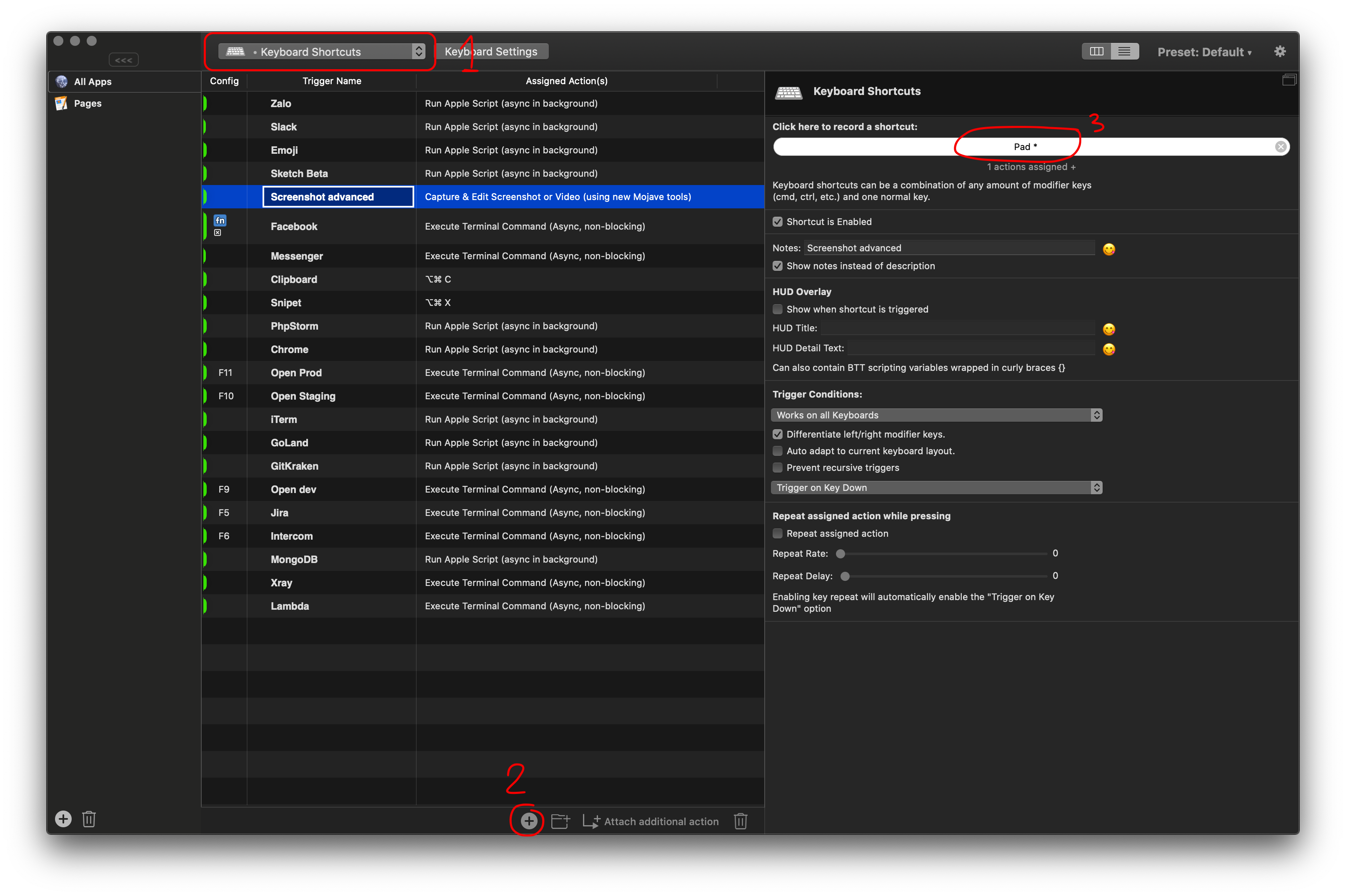
Setup keyboard shortcut
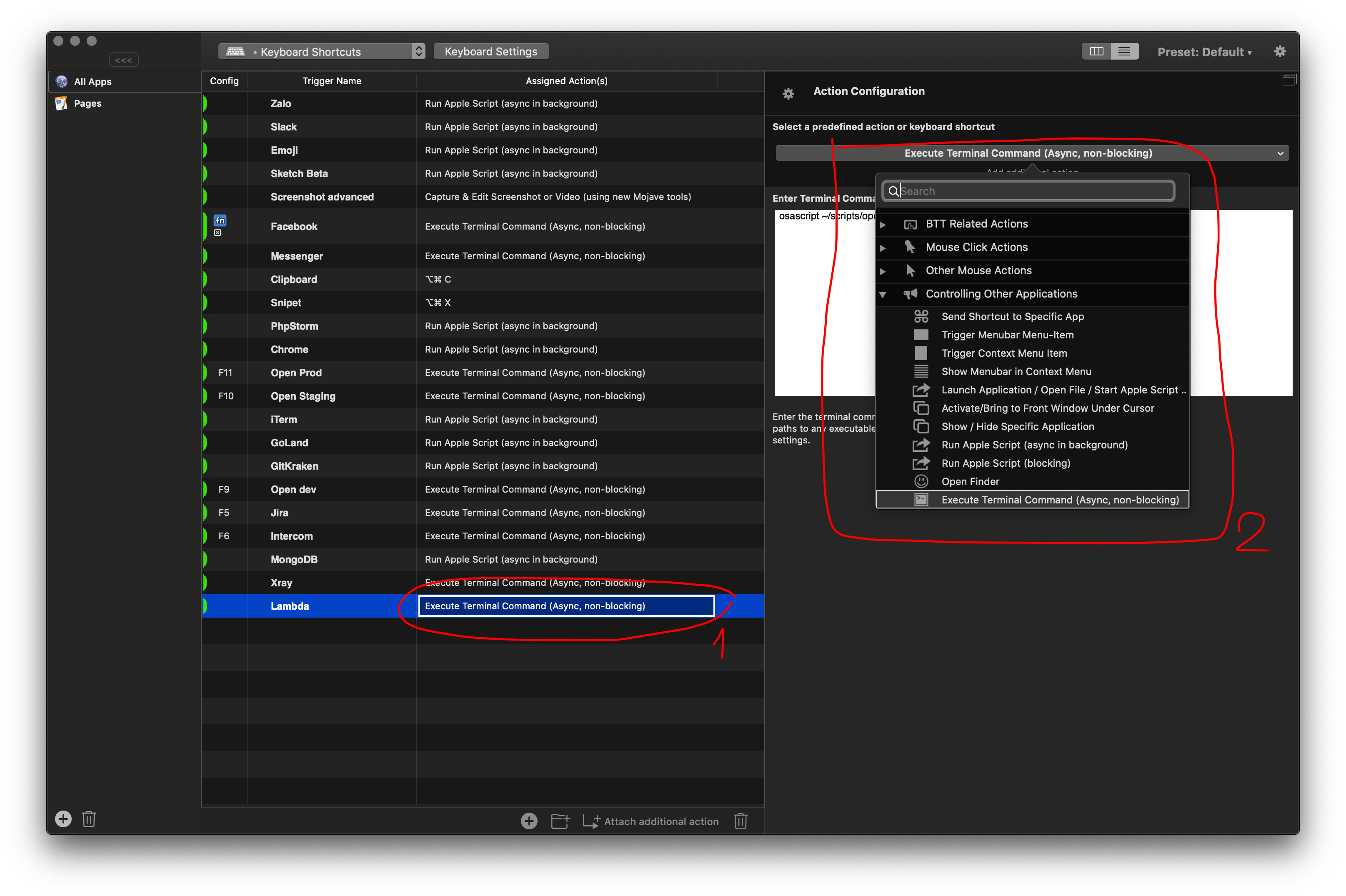
After doing so, BetterTouchTool was able to capture the event when you pressed the key. Now to trigger a certain action, do the following:
There are many actions to choose from, but here I mainly do two things: active an app window, and active a tab on chrome.
To activate an app, use the following applescript:
activate application "MongoDB Compass Community"
For activating a tab in chrome it is a bit more complicated. First you need to create the open_url.applescript file somewhere, I am gathering the scripts in the ~ / scripts directory so I will create the file ~ / scripts / open_url.applescript with the following content:
on run {targetUrl}
tell application "Google Chrome"
activate
set theUrl to my remove_http(targetUrl)
if (count every window) = 0 then
make new window
end if
set found to false
set theTabIndex to -1
repeat with theWindow in every window
set theTabIndex to 0
repeat with theTab in every tab of theWindow
set theTabIndex to theTabIndex + 1
set theTabUrl to my remove_http(theTab's URL as string)
if (theTabUrl contains theUrl) then
set found to true
exit repeat
end if
end repeat
if found then
exit repeat
end if
end repeat
if found then
set theWindow's active tab index to theTabIndex
set index of theWindow to 1
else
tell window 1 to make new tab with properties {URL:targetUrl}
end if
end tell
end run
on remove_http(input_url)
if (input_url contains "https://") then
return trim_line(input_url, "https://")
else
return trim_line(input_url, "http://")
end if
return input_url
end remove_http
on trim_line(this_text, trim_chars)
set x to the length of the trim_chars
-- TRIM BEGINNING
repeat while this_text begins with the trim_chars
try
set this_text to characters (x + 1) thru -1 of this_text as string
on error
-- the text contains nothing but the trim characters
return ""
end try
end repeat
return this_text
end trim_line
Now create the same trigger as in the previous step, but instead of choosing applescript, choose execute terminal command:
osascript ~/scripts/open_url.applescript "https://facebook.com"Now when you press the key, the script will find out if any tab is opening facebook.com or not, if so then active, if not, open a new tab.
Now map all the keys on the numpad and then cut the paper on each key so that you know how to press:
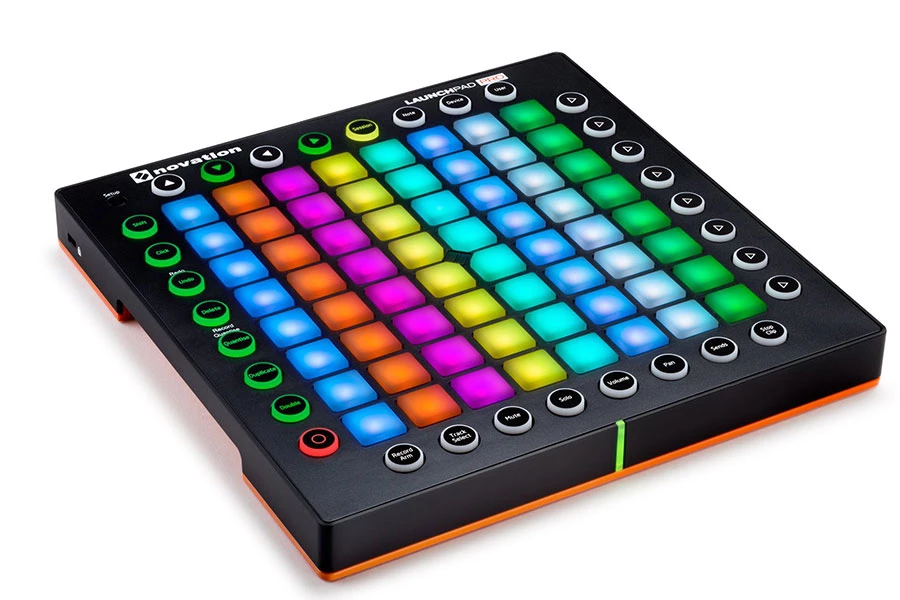
The same, but if you're richer
If you're not a poor (poor) developer, you can buy a launchpad, then match everything you have, from the app to the snippet ... until you no longer remember which key to press, Because the launchpad has 96 keys.
No comments: